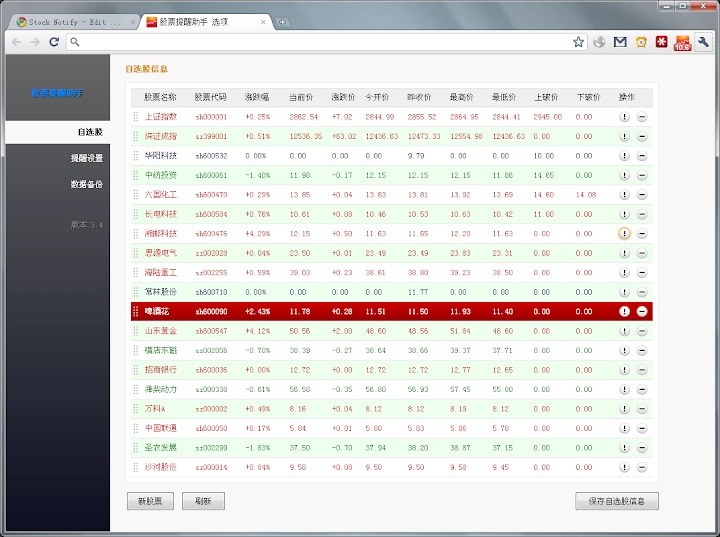

Stock Alert Assistant: Real-Time Price Monitoring
Overview
Stock Alert Assistant is a desktop utility designed to help users monitor real-time stock prices and receive timely notifications based on predefined thresholds. The software enables users to track multiple stocks simultaneously, set price alerts for specific triggers such as crossover or breakdown events, and receive visual and auditory notifications when those conditions are met. It is particularly useful for active traders, investors, and financial enthusiasts who need immediate feedback on market movements without constantly checking trading platforms.
The tool operates as a lightweight desktop application compatible with both Windows and Mac systems, offering a streamlined interface for managing stock alerts. Users can configure alerts based on price levels, percentage changes, or technical triggers, ensuring they never miss critical market shifts. The application supports custom stock entries using exchange codes like shxxxxxx or szxxxxxx, allowing users to monitor newly listed or niche securities not included in default databases.
Real-world usage scenarios include day trading, portfolio monitoring, and alert-based investment strategies. The software integrates seamlessly into daily workflows by running quietly in the background while delivering actionable alerts. With regular updates focused on stability, usability, and feature enhancements, it maintains relevance in a fast-paced financial environment.
Key Features & Capabilities
- Real-Time Price Monitoring – Tracks stock prices continuously and displays live updates in the system tray. Users can view current prices and percentage changes at a glance.
- Customizable Price Alerts – Allows setting up alerts for price thresholds (e.g., upper or lower breakout points). When a stock reaches the configured level, the software triggers a notification.
- Stock Marking & Custom Entry – Introduced in version 3.7.5, users can now mark specific stocks for quick reference. The ability to add new stocks via exchange codes (shxxxxxx/szxxxxxx) ensures flexibility for tracking emerging or lesser-known securities.
- Enhanced Notification System – Notifications appear as pop-up windows with detailed information, including price, change, and percentage movement. The interface adapts dynamically, scaling down content if it exceeds display limits.
- Visual Indicators & Icons – The system tray icon changes based on the selected stock and displays current price and performance. Hovering over the icon reveals data for the current and top five tracked stocks.
- Import/Export & Drag-and-Drop Management – Version 3.4 introduced support for importing and exporting self-selected stock lists. Users can rearrange stocks via drag-and-drop for personalized organization.
- Configurable Display Options – Includes settings to enable or disable stock images, hide price elements, and manage notification sounds and visual effects.
These features collectively support efficient market tracking and timely decision-making. For example, a trader can set an alert for a stock to trigger when it crosses a resistance level, receive a pop-up notification, and take immediate action. The tool’s minimal footprint and background operation make it ideal for multitasking environments.
User Interface, Workflow & Performance
The user interface of Stock Alert Assistant is designed with simplicity and functionality in mind. It features a compact system tray icon that serves as the primary access point. Clicking or hovering over the icon provides immediate access to key metrics, including the current stock’s price, change, and performance. The interface remains unobtrusive, ensuring it does not interfere with other tasks.
Navigating through the application is intuitive. Users can access settings via the icon menu, where they can manage alerts, adjust notification preferences, and modify stock lists. The workflow is streamlined: add a stock, set a price threshold, and activate the alert. The application responds promptly to changes in market data, delivering notifications with minimal delay.
Performance details were not specified by the developer. However, the application’s lightweight size of 2.4 MB suggests efficient resource usage. It is expected to operate smoothly on modern systems with minimal impact on CPU or memory. Stability improvements have been consistently included in recent updates, particularly in fixing display and pop-up issues.
The developer did not specify resource usage details. Performance observations are based on general software behavior patterns. The application appears to maintain stability during extended use, with no reported crashes in the provided changelog.
Compatibility & System Requirements
Stock Alert Assistant is compatible with both Windows and Mac operating systems, ensuring broad accessibility across personal computing environments. The software is available in a desktop application format, designed to run natively on supported platforms.
The installation size is 2.4 MB, indicating a lightweight footprint. This small file size suggests minimal disk space usage and fast installation times. The developer did not provide additional system requirements, such as minimum RAM, processor speed, or specific OS versions.
Exact system requirements were not listed. Compatibility information was partially provided. Users should ensure their system meets standard requirements for running desktop applications, especially those involving real-time data updates.
Pros and Cons
Pros
- Lightweight design with minimal system impact
- Real-time price monitoring and customizable alerts
- Supports custom stock entry using exchange codes
- Intuitive interface with hover and icon-based data access
- Regular updates focused on bug fixes and usability
- Free to download and use with no hidden costs
Cons
- Exact system requirements were not specified
- Limited to desktop use; no mobile or web version available
- Only basic stock data is displayed; no technical analysis tools
- File size and version details may not reflect full feature set
- Support for only 10 stocks at a time (as per earlier versions)
FAQ Section
Is Stock Alert Assistant available for both Windows and Mac?
Yes, the software is compatible with both Windows and Mac operating systems.
Can I add new stocks not in the default database?
Yes, users can add new stocks by entering their exchange codes, such as shxxxxxx or szxxxxxx, allowing monitoring of newly listed or niche securities.
Is the software free to use?
Yes, Stock Alert Assistant is available at no cost. There are no subscription fees or premium tiers.
Does it require an internet connection?
Yes, the application requires a stable internet connection to fetch real-time stock data and deliver notifications.
How often does the software update stock prices?
The software updates prices in real time. However, exact refresh intervals were not specified by the developer.
Final Thoughts + CTA
Stock Alert Assistant delivers a focused, efficient solution for users seeking real-time stock monitoring with customizable alerts. Its lightweight design, intuitive interface, and ability to track custom stocks make it a valuable tool for traders and investors who need timely market insights without the complexity of full trading platforms. While it lacks advanced analytics or multi-platform support, its core functionality is well-executed and reliably maintained through consistent updates.
For those who prioritize simplicity, responsiveness, and cost-effectiveness in their investment tools, this software stands out as a practical desktop utility. It excels in delivering timely notifications and maintaining a low profile while running in the background.
Download Stock Alert Assistant now







